.webp)
eSign Multi-Template: Simplify, Standardize, and Scale Your Onboarding
What exactly is eSign Multi-Template? To understand it, you have to first understand merchant onboarding.
Onboarding new clients or businesses isn’t as straightforward as getting a single signature on a document. Normally, there’s a laundry list of forms that a business needs to fill out. These often include a W-9 form, a credit authorization, a service agreement, maybe ownership disclosures or compliance consents, and more.
Picture asking your customer to scatter a dozen pages across five desks and telling them to sift through the piles and sign each one. That’s essentially how digital onboarding works today.
Documents are typically sent in separate emails, through different platforms, or via hardcopy PDF attachments. This disjointed process breeds confusion. On one side, applicants can easily miss an email, sign the wrong version of a document, or not notice if something is pending. On the other side, admins tend to find themselves chasing signatures, reconciling missing documents, and manually tracking statuses across multiple conversation threads.
McKinsey reported that the average onboarding process for a new corporate client can stretch up to 100 days, with a large share of that time consumed by identity validation, document submission, and account setup. According to them, “many banks simply do not have the technology infrastructure to make onboarding the seamless, transparent digital experience it needs to be.”
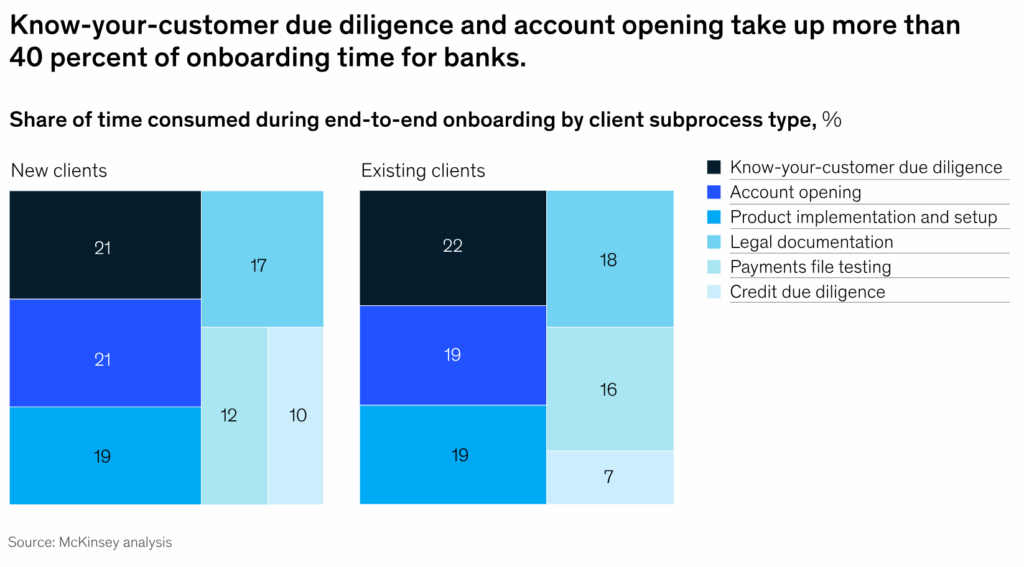
When onboarding is broken across multiple steps, it slows down operations, but with the right technology, there’s opportunity to accelerate revenue.
The Solution: eSign Multi-Template
Imagine issuing just one single invite that carries all the documents needed for onboarding. That’s exactly what the new eSign Multi-Template feature delivers. Instead of splitting document requests across several email threads or different systems, enterprises can now bundle multiple required templates into one cohesive onboarding flow.
For each applicant, the new user experience has clear guardrails. When it’s time to sign the various forms, a user will land on a checklist containing “Sign W-9, Sign Credit Authorization, Sign Service Agreement,” etc. From there, they’ll click into the first document at the top of the list, sign it, then proceed to the next document until all are completed. Once all documents have been signed, the user will submit the finished application.
No more bouncing between emails, platforms, or disparate files. Every document still receives its own secure signature, without the applicant having to look behind the scenes. This streamlined design reduces cognitive load for the applicant and gives admins one central flow to track, rather than chasing pieces across multiple systems.
Roles & Permissions
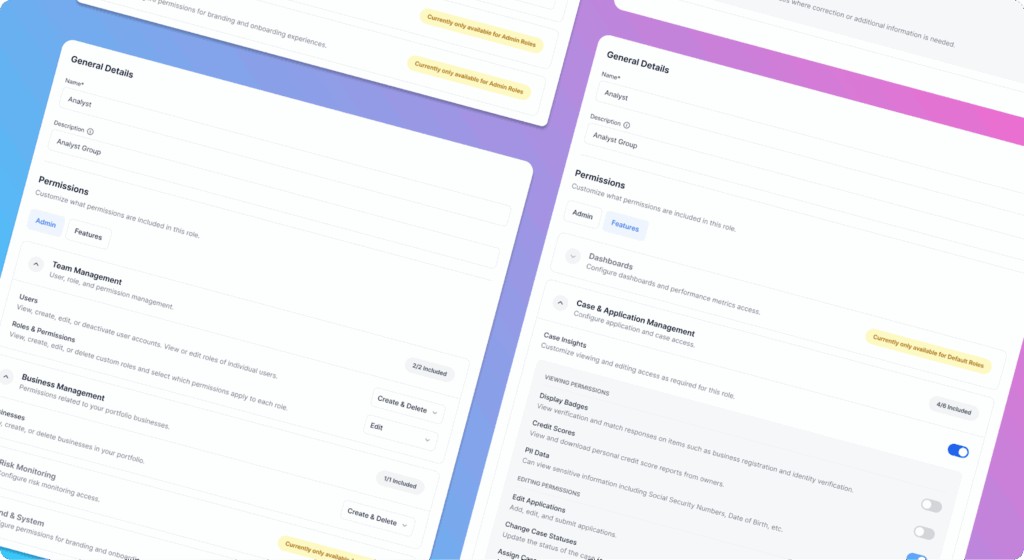
To make this work even more cleanly and securely, responsibilities are divided into clear roles with different permissions.
Worth Admin
This is the top level of template control. Worth Admins choose which templates (for example, W-9, credit consent, service agreement, compliance disclosure) are available to a particular customer. Essentially, they build a “library” of forms that the customer is allowed to use in onboarding.
Customer Admin
When a new invite needs to go out, the Customer Admin opens their invite interface and sees only the templates that the Worth Admin has assigned. From that curated set, they pick which documents each particular applicant must sign. No need to worry about irrelevant forms or outdated versions.
Applicant
Applicants only see the documents selected for them. Their view contains everything they need to sign in one place, cleanly laid out in a checklist format.
Admins / Support / Audit Role
Once the applicant finishes signing, admins and support staff get full visibility. They can go into the case record, download any signed PDF, and inspect the audit trail. Everything ties back to the case, so nothing is lost or ambiguous.
The relationship between these different roles functions similar to file and folder permissions in Google Drive. The Worth Admin gives a “folder” of forms to a customer. The Customer Admin picks which files from that folder go in each invite. The applicant only sees the necessary files, and when they sign, the completed documents and logs go back into a folder that Support can review.
The Benefits
Speed
Signing workflows often introduce friction. According to Adobe, digitizing signature workflows saves 1.5 hours per transaction on average by eliminating manual steps. When each document request is manual or separate, onboarding slows down significantly, but bundling signatures into a more fluid flow helps reclaim that time.
Reduced cost
Manual, PDF, paper, or email–based signature processes bring hidden costs: printing, scanning, shipping, human follow-up. Another Adobe report found that eliminating inefficiencies in signature workflows saves organizations roughly $6 per transaction just in document handling costs. Over many signings, that adds up.
Reduced errors, and increased completion rates
When applicants see a checklist of all required documents in one place, completion rates go up. There’s less chance someone missed one or signed an incorrect version. Admins gain clear visibility of which docs are outstanding. That reduces back-and-forth and version chaos.
Compliance & audit assurance
Since every signature is recorded with timestamp, document ID, and user, the entire audit trail is built-in to the product. Compliance no longer needs to piece together logs across systems. When legal or support teams need to verify who signed what and when, all the information is readily available in one record.
Scalability & consistency
As businesses grow, they need new document types, including disclosures, compliance addenda, supplemental agreements, and more. With this eSign Multi-Template, you don’t need to reinvent the wheel as document signing scales. Worth Admins can manage template libraries, and Customer Admins can compose invites from that curated library. This reduces engineering overhead and ensures consistent document quality.
Conclusion
The more complex onboarding becomes, the more valuable simplicity gets. eSign Multi-Template removes the clutter so your customers can focus on joining your network, not fighting paperwork. By reducing friction, standardizing workflows, and centralizing compliance data, businesses can finally onboard at the pace their growth demands.



.webp)


