.webp)
How Custom Roles Let You Define Access
Back in the early days of software, access control was simple: if you were a user, you either had access or you didn’t. Over time, systems adopted role-based access control (RBAC) to shift permissions away from individuals and into roles, making management scalable and more secure.
In underwriting and onboarding platforms like Worth, the same principle applies.
Not every user needs to see the same information.
A junior analyst doesn’t need full visibility into high-risk escalations. A partner or independent seller doesn’t need the ability to edit internal underwriting notes. When permissions aren’t designed with intention, you invite data leaks, compliance headaches, and more confusion.
The idea is straightforward. Build the system with custom roles so that each user only sees what’s relevant to them. As the business evolves, the role structure should evolve right alongside it.
Why Access Control Matters in Underwriting
In regulated industries, unbalanced access control isn’t just an inconvenience. It’s a liability. Regulators expect financial institutions to prove that sensitive data and risk decisions are only accessible to the right people at the right time.
In underwriting, the consequences of poorly defined roles are real. If every user sees everything, you lose accountability. But if permissions are too rigid, you end up slowing down workflows and creating bottlenecks. The balance that needs to be maintained between visibility and restriction.
When teams have clear access boundaries, the work is cleaner and faster. Compliance officers stop wasting hours chasing down which role approved what, and leadership gets the full picture of the audit trail, matching responsibilities with actions.
Four Foundational Roles
Worth’s new custom roles system starts with four base groups: Owner Admin, Admin (CRO), Risk Analyst, and Viewer.
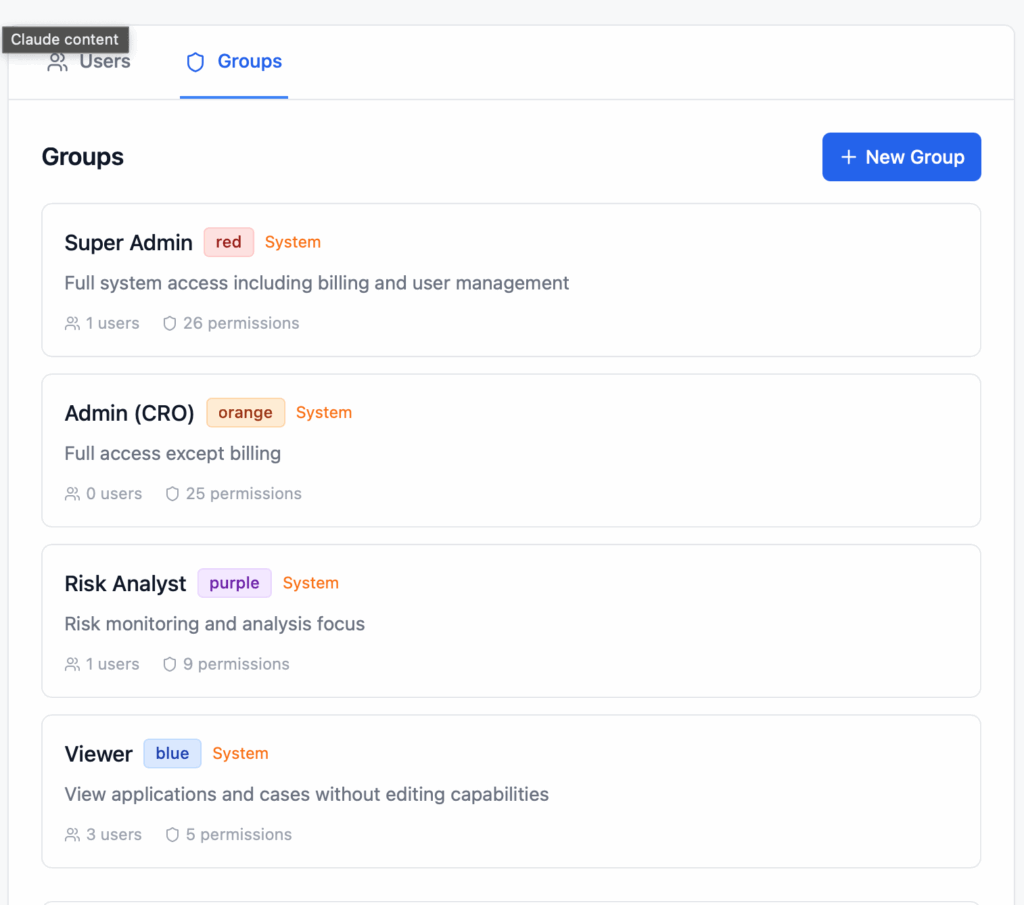
Super Admin
The Super Admin sits at the very top of the system. They hold full authority, both creating new user types as well as assigning and reassigning roles. This role can’t be deleted or stripped away. Think of it as the institution’s root account designed to safeguard continuity.
Admin (CRO)
The Admin, often a CRO or senior leader, manages daily operations. They don’t need billing access, but they do need the ability to oversee underwriting, applications, and risk processes. This role gives executives oversight without overwhelming them with system details.
Risk Analyst
The Risk Analyst is a power user of the platform, living in the trenches of the day-to-day. They need access to applications, cases, and scoring engines so they can flag anomalies and manage alerts. This role strips away distractions and ensures analysts stay focused on risk, not administrative work.
Viewer
The Viewer role provides read-only access, which is ideal for compliance teams, auditors, or external stakeholders who need transparency, but not editing privileges. It’s a safeguard that brings people into the system, without handing them the keys.
By defining these roles clearly, institutions align technology with real-world responsibilities. No more one-size-fits-all access. Each role is tailored to the work being done.
The Power of Custom Groups
No two organizations look the same. A regional credit union has different needs than a national bank or a healthcare lender.
That’s where custom groups come in.
Admins can create new groups for specialized teams, like “Partner Risk Viewer” or “Sales Viewer.” These groups carve out access apt for the viewer instead of inundating them with details and noise. That flexibility reduces the need for extra tools or shadow systems. Instead of providing data access through complex workarounds, admins can easily configure roles to match their unique team structures.
The real power here isn’t just in flexibility, it’s in scalability. As your business grows, new teams, partners, or compliance units can be slotted into the system without rewriting how permissions work. Custom groups let your access structure grow with you, instead of forcing you into rigid molds.
Handling Edge Cases
Even the most seamless role design by admins can’t anticipate every situation. Vacations, audits, or short-term projects occasionally require giving a user temporary access that they wouldn’t normally have.
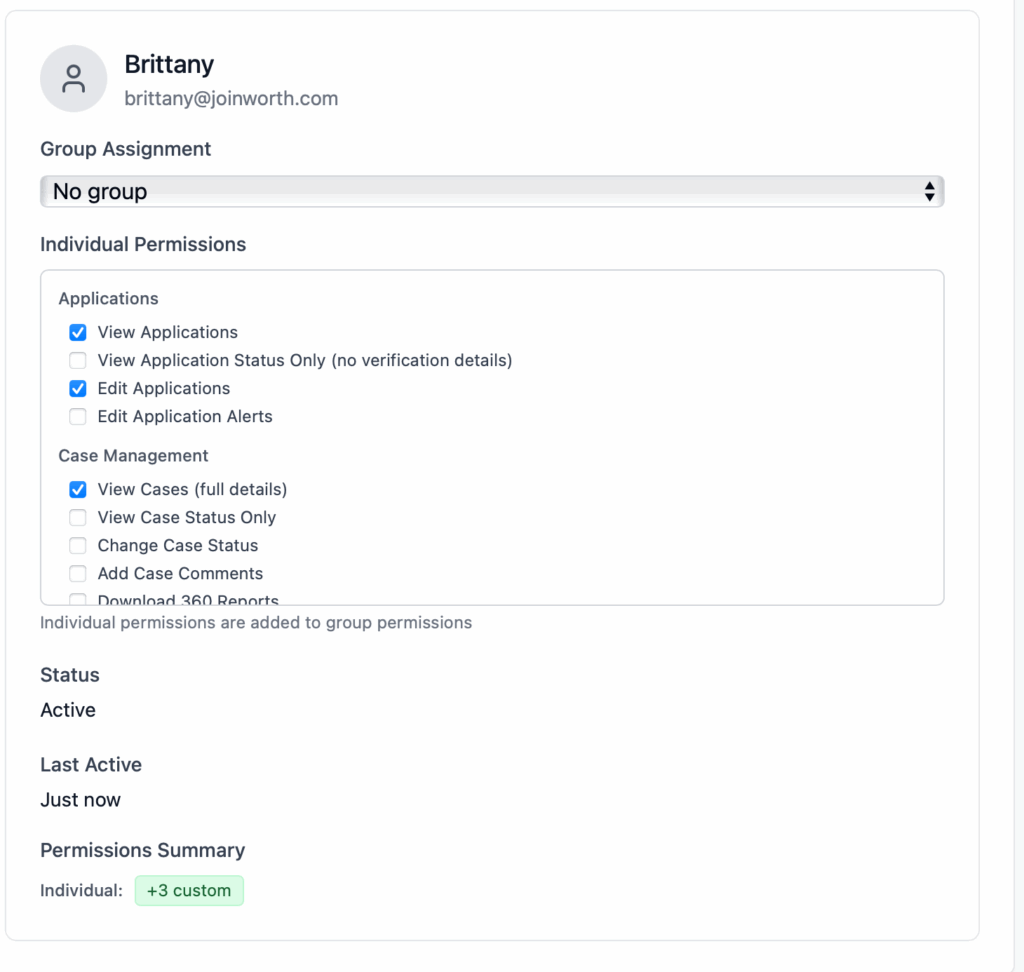
In addition to the 4 custom roles, Worth’s platform also allows for individual permissions. Admins can grant overrides for a limited time without reassigning the overall structure. It’s a temporary exception designed to make access control easier. The analyst covering for a colleague can get access for just as long as they need it, but once the time has elapsed, the system reverts back to its baseline structure.
Common Edge Case Scenarios
1. Partner or ISO Collaboration
“Partner Viewer” and “Sales Viewer” custom roles limits visibility to essential cases without exposing the rest of the system.
2. Temporary Access for Auditors or Consultant
Auditors can be granted time-bound, read-only access to specific data for the duration of a review. Once it ends, access automatically expires without the need for manual permission changing.
3. Cross-Department Assistance
If onboarding staff need to help risk analysts for a week, admins can grant limited case-viewing permissions without changing group structures or long-term roles.
4. Role Handoffs During Leave
When someone, say a Risk analyst, goes on leave, another colleague can receive temporary role privileges to handle the workload. After the set period, permissions revert automatically, preserving hierarchy and ownership.
5. Time-Based Sandbox Access for Testing
Admins testing new integrations can enable a “Testing Access” override that expires after a day or two—allowing validation without lasting data exposure.
Edge cases no longer mean bending rules or creating messy one-off accounts. They’re handled inside the system, transparently, with guardrails and room for growth.
Built for Scale: Cases, Applications, and Dashboards
MIT Sloan’s paper on Rethinking Hierarchy stipulates that when organizations grow, they need to balance the autonomy of individuals with the coordination needs of large systems, and that without clear governance, decision rights loosen and complexity becomes unmanageable.
To handle scaling teams, custom roles can’t just operate at the role level. They need to extend into the actual workflows underwriters use every day.
Applications can be set to status-only views for some users, full edit rights for others, or restricted entirely for certain groups. Case management allows you to separate who can add comments, who can edit, and who is an observer. Additionally, dashboards can be tailored so executives see high-level insights while analysts have the flexibility to dive into the details.
Custom roles and permissions lead to a streamlined workflow for every role. Analysts aren’t distracted by irrelevant reports. Executives don’t waste time scrolling through case notes. Each user works inside a cleaner, more focused environment. Worth’s permission system scales without adding chaos, so adding new roles or teams never disrupts how people work.
Why It Matters: Compliance and Confidence
At the end of the day, the custom roles and permissions capability delivers more than just convenience. It directly supports compliance. Regulators expect institutions to show not just what decisions were made, but who made them and whether that person had the authority to do so. With dynamic access control, those answers are built into the process.
For underwriters, that means defined access that mirrors daily workflows.
For compliance officers, it means no more stitching together audit trails. The full story is documented automatically
And for leadership, it means knowing the platform reflects both operational needs and regulatory standards.
Custom roles make workflows smoother. They eliminate noise, reduce risk, and scale with your teams. Underwriting is rarely a solo act. It’s a team sport. Risk analysts, CROs, sales partners, and auditors all play different parts. Worth’s permissions system aligns access with responsibility so teams can move faster without losing control.



.webp)


